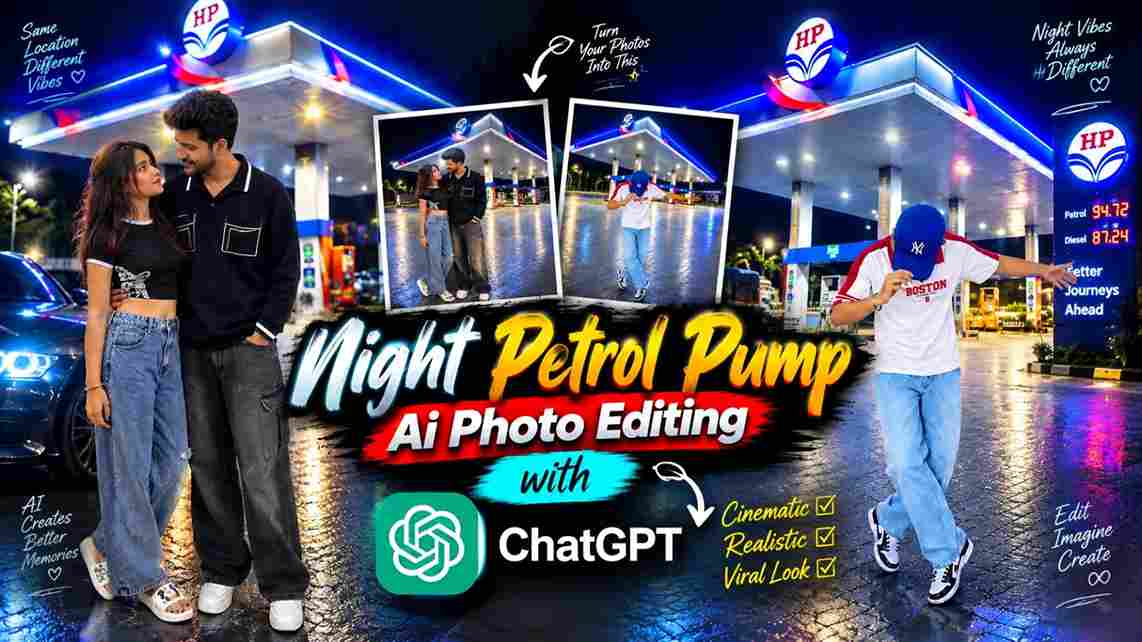
If you want to create a realistic night photo without actually visiting a petrol pump, the Night Petrol Pump AI Photo Editing Prompt 2026 can help you create this type of image with AI. This trend is useful for turning a normal portrait into a cinematic-looking night scene by combining your photo with a suitable petrol pump background. The main idea is to make the person look naturally present at the location instead of looking like the background was simply added behind them. With the right reference images and a detailed prompt, you can create realistic lighting, shadows, reflections, and an overall night-time photography effect.
What Is Night Petrol Pump AI Photo Editing?
Night Petrol Pump AI Photo Editing is a creative photo editing technique that uses AI to place a person into a petrol pump scene during the night. You can use one image as the person reference and another image showing the petrol pump as the location reference. The AI then combines the important details from both images according to your instructions. You can ask it to preserve your face, hairstyle, clothing, pose, and body proportions while matching the lighting and perspective of the new location. This makes the final image appear more like a real photograph taken at the petrol pump rather than a simple background replacement.
Night Petrol Pump AI Photo Editing Prompt
Use this prompt with your person photo and petrol pump background photo:
Save this image for the background ⬇️
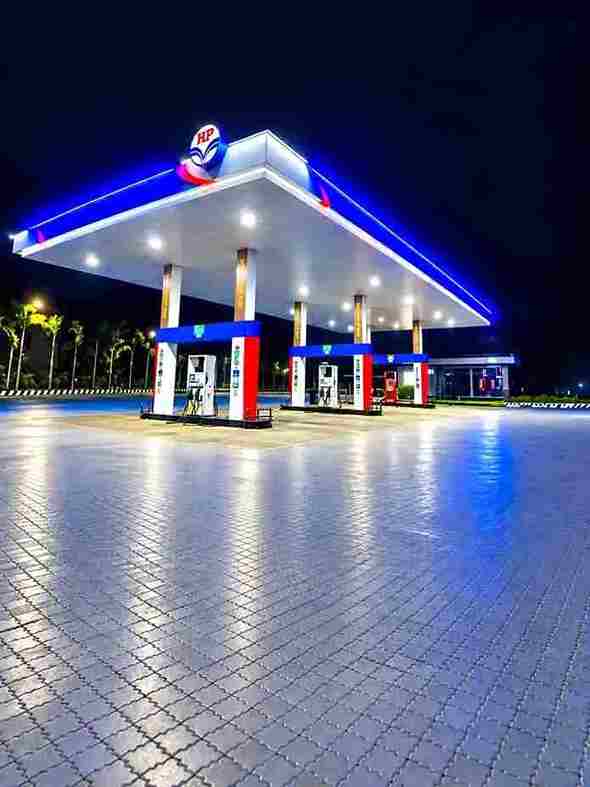
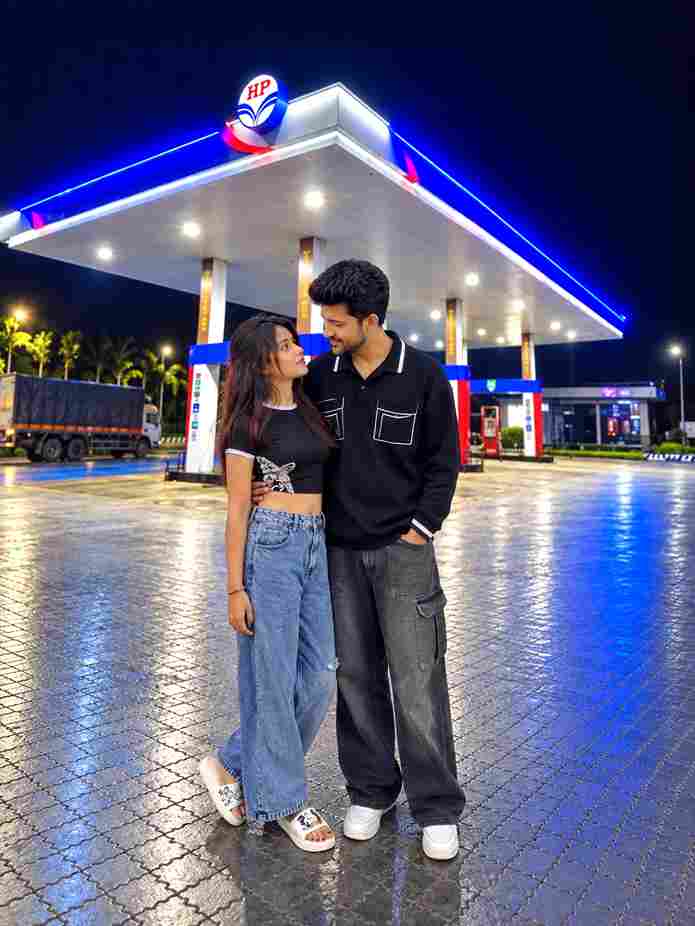
Use the first image as the exact reference for the person and the second image as the exact HP petrol pump background. Place the person naturally into the HP petrol pump scene without changing anything about her original appearance. Strictly preserve her exact face, facial features, skin texture, hairstyle, hair color, body shape, clothes, shoes, handbag, pose, proportions, and identity exactly as in the original photo—no beautification, no face alteration, no outfit changes, and no AI-looking details. Only composite the person realistically into the petrol pump background with natural perspective, accurate scale, matching lighting, shadows, reflections, and realistic color grading so she looks genuinely photographed at the location. Keep the HP petrol pump background authentic and unchanged, and make the final image a 3:4 portrait aspect ratio in high quality and photorealistic detail.
How to Create a Night Petrol Pump AI Photo
To create this type of image, first select two suitable photos. Your first photo should clearly show the person, while the second should show the petrol pump location you want to use. Upload both images to an AI photo editing tool that supports reference images. Add the Night Petrol Pump AI Photo Editing Prompt and generate the image. Once the result is ready, do not save it immediately. First, zoom in and check the face, hands, clothes, body shape, lighting, and shadows. Also check whether the person fits naturally into the location. If you notice any unwanted changes, adjust the prompt and generate another version with more specific instructions.
Select the Right Person Photo
The person reference is one of the most important parts of the editing process. Choose a clear image where the face, hairstyle, clothing, hands, and body position are easy to see. If possible, use a high-resolution photo without heavy filters or excessive blur. The pose should also be suitable for the petrol pump background you have selected. For example, a standing portrait can be easier to place naturally into a standing area of the location. When the reference photo is clear, the AI has more useful information to work with. This can help maintain the person’s appearance while changing the surrounding environment.
Choose a Suitable Petrol Pump Background
The second image should clearly show the petrol pump scene you want to recreate. A good night background should have visible station lights, pumps, surrounding structures, and enough open space for the person to be placed naturally. Try to select a background where the camera angle matches the angle of your person reference. Perspective is important because a mismatch can make the final image look unnatural. You can also choose a background with interesting lighting, such as bright station lights against a darker sky. A detailed and high-quality background gives the AI more information for creating a realistic composite.
Add a Cinematic Photography Effect
After matching the subject and background, you can give the final image a subtle cinematic appearance. You can mention realistic depth of field, natural contrast, sharp subject details, soft background elements, and DSLR photography in the prompt. Petrol pump lights can create attractive highlights in the background, while the darker surroundings can add depth to the composition. However, avoid adding excessive blur, glow, or artificial effects because they can make the image look less realistic. A clean cinematic style with natural skin texture, realistic shadows, and balanced colors can give the photo a professional appearance while still making it look like a genuine night photograph.
Conclusion
The Night Petrol Pump AI Photo Editing Prompt 2026 is a creative way to give an ordinary portrait a completely different night-time setting. By combining a clear person reference with a suitable petrol pump background, you can create a realistic scene with station lights, natural shadows, matching perspective, and a cinematic photography feel. The key is to focus on realistic integration rather than simply changing the background. Use good-quality images, preserve the important details of the person, and carefully review the generated result before saving it. You can also experiment with different petrol pump locations, poses, and lighting conditions to create your own unique version of this popular AI photo editing style.