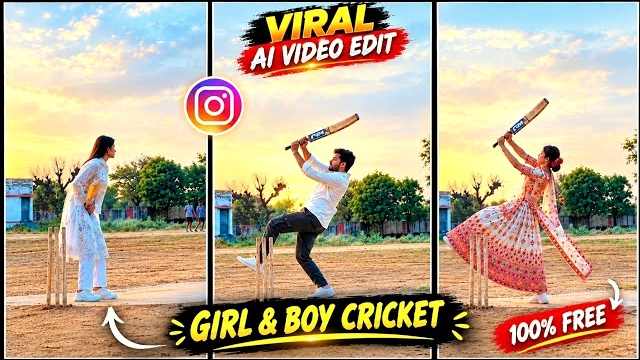
Are you looking to create a trending Cricket AI Video for Instagram Reels or YouTube Shorts? With AI video generation tools, you can transform an ordinary photo into an exciting cricket-themed video featuring realistic batting shots, stadium lighting, energetic crowds, and cinematic camera movements. The Trending Cricket AI Video Editing Prompt is perfect for cricket lovers who want to create a unique sports video using their own photo. You do not need professional video editing skills to get started. Simply upload your photo to a compatible AI tool, copy the prompt shared below, and generate your own cricket-style video for social media.
Trending Cricket AI Video Editing Prompt
If you want to create a realistic cricket video using your photo, copy the prompt below and use it with a compatible AI video generation tool. For the best results, upload a clear reference photo and make sure your face is visible.
Copy This Cricket AI Video Prompt
Create an ultra-realistic cinematic video matching the provided reference video as closely as possible. Vertical 9:16 aspect ratio, 4K quality, natural lighting, realistic human movements, and a continuous single camera shot.


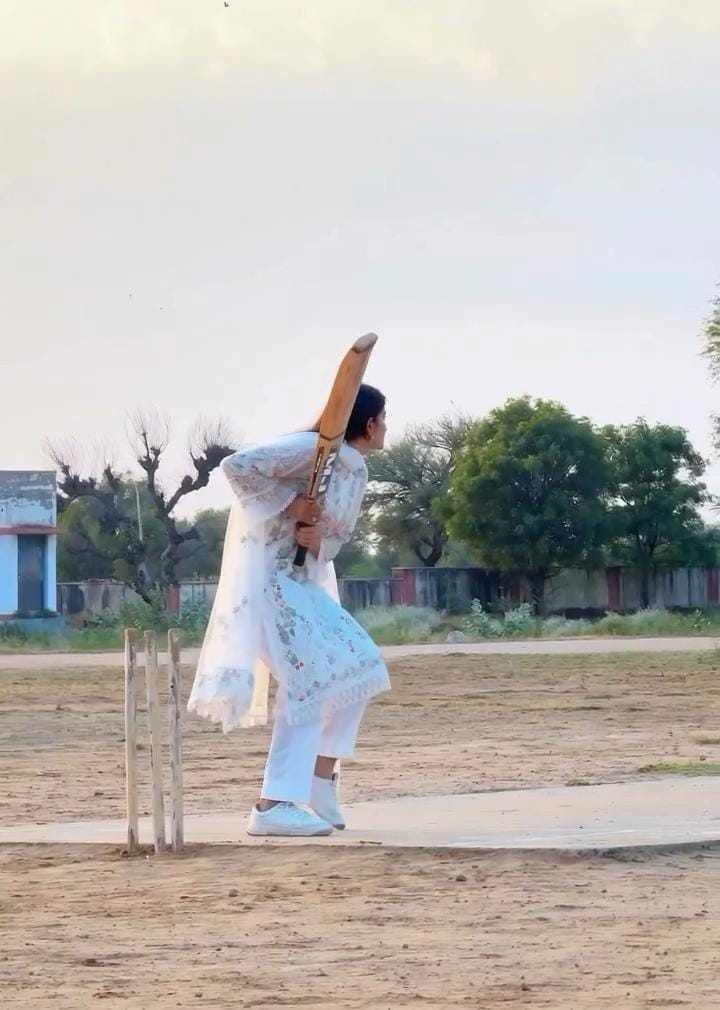
Scene and Character: A young Indian woman wearing a beautiful white embroidered salwar kameez, matching white trousers, and a lightweight white dupatta. Her long, dark hair is tied back. She is standing on a flat, dusty cricket ground in a rural Indian village. Three cricket stumps are placed beside her on the left side of the frame. In the background, there are green trees, a small rural building, an open field, and a pale cloudy evening sky.


ACTION — SECOND BY SECOND:


0–2 seconds: The woman stands beside the cricket stumps, holding a wooden cricket bat with both hands. She bends forward slightly and looks toward the expected direction of the cricket ball. Her posture is focused and natural.


2–4 seconds: She prepares to play a cricket shot, adjusting her stance and bringing the bat upward. Her white dupatta hangs naturally and moves gently with her body.


4–6 seconds: She swings the cricket bat upward with both hands, turning her body naturally. One leg rises as she performs an energetic batting follow-through. Her long hair and white dupatta flow naturally with the movement.


6–8 seconds: She continues the batting action, lifting the bat high above her shoulder and briefly balancing on one foot. Her movements resemble the reference video, with realistic body weight and natural cloth physics.


8–10 seconds: She brings the bat down in front of her, steps forward, and finishes the movement. She turns slightly toward the camera with a relaxed facial expression while standing on the cricket pitch.


CAMERA AND VISUAL STYLE: Fixed camera position, full-body wide shot, eye-level perspective, the woman visible from head to toe throughout the video. Keep the cricket stumps visible on the left. No cuts, no camera shakes, no sudden zooms, and no scene transitions. Soft natural daylight, realistic shadows, natural skin texture, detailed white fabric embroidery, realistic hair movement, and authentic rural Indian surroundings.


IMPORTANT CONSISTENCY RULES: Maintain the same woman's face, hairstyle, white outfit, cricket bat, body proportions, background, and camera angle throughout the entire video. Make the action continuous, physically believable, and as close to the reference footage as possible. Do not add a visible cricket ball unless it is present in the reference.


NEGATIVE PROMPT: Cartoon, animation, unrealistic movements, extra fingers, deformed hands, distorted face, duplicate person, extra cricket bats, floating objects, changing clothes, changing background, incorrect cricket stumps, flickering, unnatural body movement, camera cuts, artificial lighting, text, subtitles, logos, and watermarks.
How to Create a Cricket AI Video Using Flow AI
You can use a compatible AI video generation tool, such as Flow AI, to create your cricket video. First, choose a clear photo of yourself that you want to use as the character reference. Open Flow AI and start a new project. Select a suitable image-to-video or other supported video generation option and upload your reference photo. Copy the Trending Cricket AI Video Editing Prompt from this page and paste it into the prompt box. Check that your photo and prompt are ready, then generate the video. Once the result is available, preview it carefully to check the facial identity, batting movements, and overall quality. The available features and generation steps may vary depending on the tool and your account.
Tips for Getting the Best Cricket AI Video
For better results, use a clear, high-resolution photo with good lighting and a visible face. If you want the AI to create a full-body batting scene, choose a reference image that shows enough of your body or use a tool that supports generating new scenes from a portrait. Keep your prompt focused on the cricket action you want to show, such as batting, bowling, fielding, or celebrating a boundary. If the first result has unnatural movements, simplify the action or generate another version. You can also add suitable cricket background music, sound effects, and captions using a video editor after generation. Always preview the final video before sharing it online.
Make Your Cricket AI Video Go Viral
To make your Cricket AI Video more engaging, start with an exciting moment, such as preparing for a powerful shot or hitting a six. Use a vertical 9:16 format for Reels and Shorts, and keep the video short enough to hold viewers’ attention. You can add a catchy title such as “My AI Cricket Moment” or “If I Played in a Cricket Stadium” to make the concept clear. Use relevant hashtags like #cricketai, #aivideo, #cricketedit, and #aivideoediting rather than adding unrelated tags. Remember that viral reach is never guaranteed, so focus on creating an original, entertaining video that viewers will enjoy watching and sharing.
Common Problems With Cricket AI Video Generation
Sometimes an AI-generated cricket video may have an altered face, incorrect bat movements, a distorted ball, or unrealistic hand positions. These issues can occur when the tool struggles to generate complex sports movements. To improve the result, use a clear reference photo, describe one main action at a time, and avoid putting too many different scenes into a short prompt. If the video still looks unnatural, try generating a shorter clip or adjusting the prompt to focus on a single batting shot. Different AI tools have different capabilities, so the final result may vary. You can also use a video editing app to trim unwanted frames and improve the final presentation.
Final Words
The Trending Cricket AI Video Editing Prompt is a fun way to turn your photo into a cinematic cricket-themed video with realistic stadium effects and exciting batting action. Use the ready-to-copy prompt, follow the Flow AI instructions, and experiment with different cricket scenes to create your own version. You can share the finished video on Instagram Reels, YouTube Shorts, and other social media platforms. I hope this guide helps you create your own Trending Cricket AI Video.