Create a beautiful and cinematic Ganpati Bappa video using AI with this Viral Ganpati Bappa AI Video Editing Prompt. You can turn a simple Ganpati Bappa image into an attractive devotional video with smooth camera movement, glowing lights, festive decorations, and realistic visual effects. The best part is that you do not need advanced video editing skills to try this effect. With a suitable reference image and Flow AI, you can create a unique Ganpati Bappa video for Instagram Reels, YouTube Shorts, Facebook Reels, and other social media platforms.
What Is Viral Ganpati Bappa AI Video Editing?
Viral Ganpati Bappa AI Video Editing is a creative way to animate a Ganpati Bappa image with the help of AI video generation. Instead of manually adding every movement and effect, you can upload an image and use a detailed video prompt to describe how you want the scene to move. The AI can create smooth camera motion, glowing lights, floating flower petals, gentle atmospheric effects, and a cinematic devotional environment. You can experiment with different images and prompts to create your own version of the trending Ganpati Bappa video style.
Ganpati Bappa AI Video Editing Prompt
Upload your Ganpati Bappa image to Flow AI and paste the following prompt:
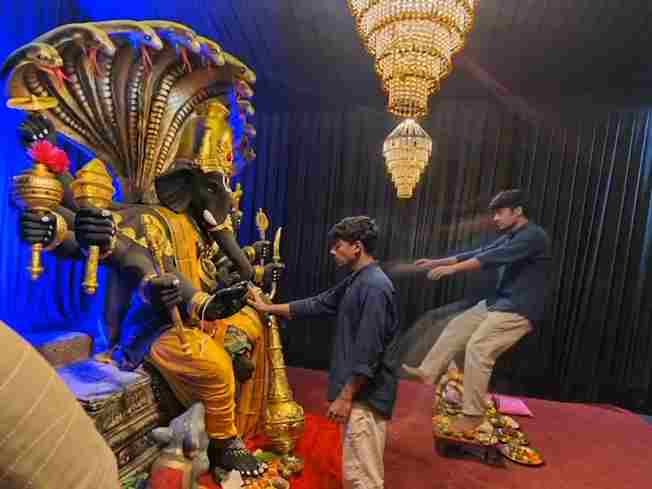
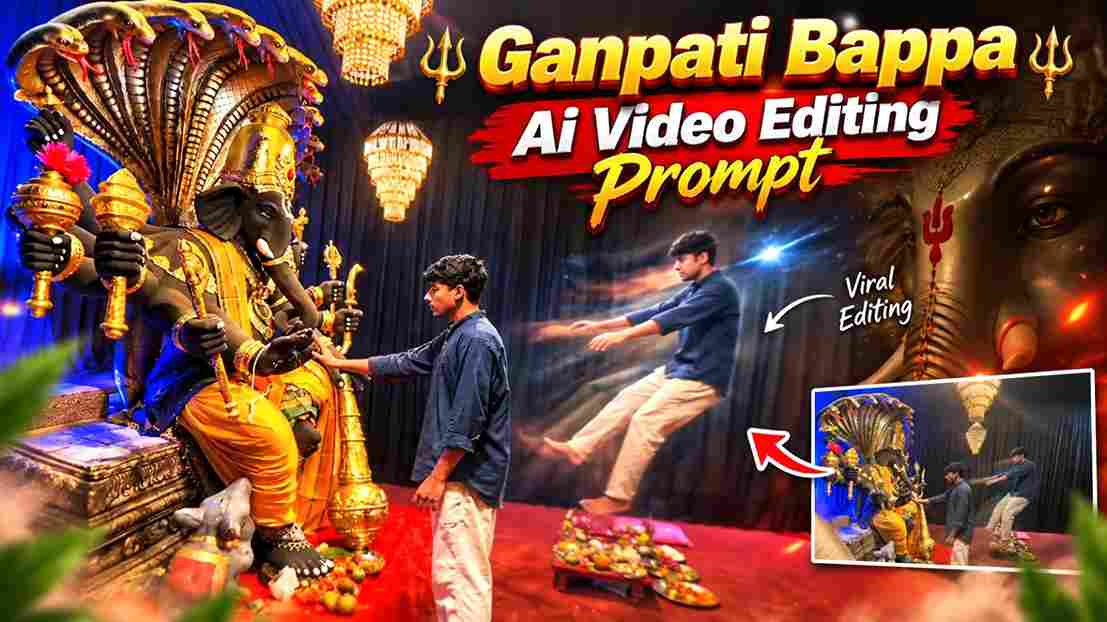
Create a near-square devotional VFX fantasy video inside a richly decorated Ganesh pandal hall. A young barefoot devotee with curly dark hair, light stubble, a dark navy button-up kurta-shirt, and beige trousers stands before a colossal graphite-black Ganesha murti seated in lalitasana on a carved throne. Ganesha wears a golden jeweled crown, white tusks, a left-curving trunk, multiple arms holding a mace, trident, sword, fly-whisk, and blessing hand, a mustard-yellow dhoti with green sash, and detailed gold jewelry. A seven-hooded cobra canopy fans behind the idol with visible red tongues, with a grey mushika at the feet and red cloth at the base. The hall has electric-blue glowing drapes, black curtain walls, crystal chandeliers, a red carpet, and an offering table with fruit plates, brass lamps, a small Ganesha idol, and a pink cloth/book.

Camera direction: Start with only a brief small front-facing camera shot showing the devotee approaching and looking up at Bappa. Then transition into the entire main sequence from the RIGHT SIDE of Bappa, maintaining a cinematic side perspective. In the right-side view, frame the devotee through the foreground silhouette of Bappa’s black head/tusk and a golden kalasha topped with a huge magenta flower. The devotee slowly extends his arm toward the deity with awe and solemn focus. Cut to an extreme macro close-up of his fingertip touching Bappa’s black finger with a gold-tipped nail, creating a dramatic Creation-of-Adam-style contact with blue-gold bokeh.

Immediately at the touch, keep the devotee’s real body physically anchored with his hand resting on Bappa’s forearm, while a translucent, motion-blurred duplicate of the same devotee emerges from him and is pushed/levitated backward and upward across the hall toward the right side of the frame, arms outstretched, drifting farther away frame by frame. The ghost duplicate passes visually beyond the offering table and continues toward the edge of the frame. Keep the camera locked in the right-side wide perspective during the VFX payoff so the supernatural movement feels clear and realistic. End mid-float.

Highly realistic cinematic VFX, devotional atmosphere, stage-lit saturation, blue-versus-gold contrast, warm chandelier glints, realistic fabric and skin textures, volumetric light, subtle incense haze, physically accurate shadows, natural motion blur, detailed jewelry, cobra tongues, mushika, fruit thali, brass lamps, bare feet on red carpet. No dialogue, no lip-sync, no text, no subtitles. Temple bells and deep devotional score implied. Preserve the exact identity and appearance of the devotee throughout; no face distortion, no extra people, no unnecessary background changes.
How to Create Viral Ganpati Bappa AI Video Using Flow AI
Creating this video with Flow AI is simple. Just follow these steps:
- Open Flow AI and sign in to your account.
- Start a new project and upload your Own image.
- Copy the Ganpati Bappa AI Video Editing Prompt from this article.
- Paste the video prompt into the Flow AI prompt box.
- Click the Generate button and wait for your AI video.
- Preview the generated video and check the overall result.
- Download your final Ganpati Bappa AI video and share it.
Choose the Right Photo of Yourself
The photo you upload is important for getting a natural AI video result. Choose a clear, high-quality photo of yourself where your face and overall appearance are clearly visible. A well-lit photo with a simple background can help the AI understand your facial features and create a more consistent result. Try to use a photo where your face is not covered by sunglasses, hands, or other objects. Avoid blurry or low-quality images, as they may affect the final video quality and cause unwanted changes to your face or appearance.
Add Beautiful Cinematic Effects
To make your Ganpati Bappa AI video more attractive, you can include subtle cinematic effects through the prompt. Warm golden lighting, soft glowing particles, flower petals, gentle incense smoke, and a slow camera movement can create a peaceful devotional atmosphere. The effects should remain subtle so that Ganpati Bappa stays the main focus of the video. A slow camera push-in or gentle movement around the idol can also make the image feel more dynamic. Keeping the animation simple can help the final video look cleaner and more natural.
Tips for Better AI Video Results
Always use a clear reference image and keep your prompt specific about the details that should remain unchanged. Mention the idol’s face, ornaments, crown, clothing, colors, and overall appearance if consistency is important. Avoid adding too many complicated movements because they can sometimes create unwanted changes. If the first generation does not look right, make small changes to the prompt and generate another version. Before posting, check the idol, hands, ornaments, lighting, background, and camera movement carefully. Choose the version that looks natural and matches the style you want.
Make Your Ganpati Reel More Attractive
After generating your AI video, you can add the final touches using your favorite video editing app. Add suitable devotional music, gentle sound effects, or a simple text overlay such as “Ganpati Bappa Morya.” You can also combine two or three AI-generated clips to create a short devotional montage. Keep the transitions smooth and avoid adding too many effects. For Instagram Reels, YouTube Shorts, and Facebook Reels, a vertical format can give your video a full-screen presentation. Preview the complete video before exporting to make sure everything looks clean.
Share Your Viral Ganpati Bappa AI Video
Once your video is ready, you can share it across your social media platforms. Instagram Reels, YouTube Shorts, and Facebook Reels are suitable places for short AI-generated devotional content. Add a simple caption and relevant hashtags related to Ganpati Bappa, Ganesh Chaturthi, AI video editing, and devotional videos. You can also share the prompt with your audience if you want others to try the same editing idea. Creating different versions with new backgrounds, lighting, and camera movements can help you develop your own creative style.
Final Words
The Viral Ganpati Bappa AI Video Editing Prompt gives you a simple way to transform a Ganpati Bappa image into a cinematic devotional video using Flow AI. You only need a suitable reference image and the ready-made prompt from this article to get started. Experiment with different images, lighting styles, camera movements, and festive backgrounds to create your own unique video. Always check the generated result before sharing it and make small prompt changes when needed. I hope this guide helps you create a beautiful Ganpati Bappa AI video for your Instagram Reels, YouTube Shorts, or Facebook audience.